
Agent-ready markdown, crawler analytics, and a calmer dashboard
Markdown that AI agents can actually read
Every published post has always advertised a markdown twin. Now it returns markdown.
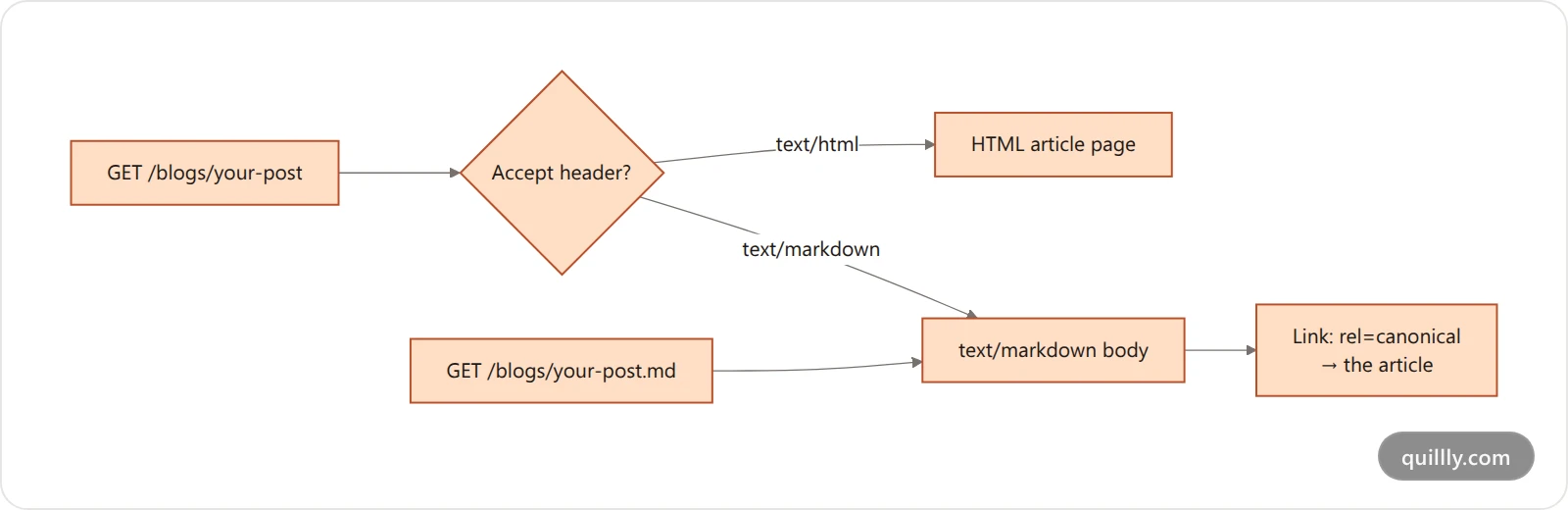
yoursite.com/blogs/your-post.mdreturns realtext/markdown— the article body and nothing else. No navigation, no cookie banner, no page chrome.The article URL itself serves markdown when a client asks for it with
Accept: text/markdown, so an agent never has to know a second URL exists. Browsers still get HTML.One serializer feeds
.md, llms.txt and the negotiated response, so the three can't drift apart.
It matters because an AI crawler reading your HTML spends most of its context budget on markup it will throw away. Clean markdown is the same article at a fraction of the tokens, which makes the whole piece far likelier to survive into an answer.
One canonical URL again
The markdown twin used to declare itself canonical. That put two identical documents in front of Google and let them compete.
.mdandllms.txtresponses now send aLink: <article-url>; rel="canonical"header pointing back at the HTML article — the header form, because a plain-text response has no<head>to put a tag in.Sitemaps list canonical HTML URLs only: one entry per post instead of three. The markdown representations stay reachable and stay out of the index.
This follows Google's own guidance that alternate representations should point at a single canonical URL rather than nominate themselves — see Google's canonicalization documentation.
Agents can find your index
robots.txtnow advertises yourllms.txtlocation, and every markdown response opens with a pointer to it.Crawler rules are generated from Quillly's crawler directory instead of a hardcoded handful, so all 44 tracked AI and search crawlers get an explicit group. Add a crawler to the directory and it appears in
robots.txton the next request — nothing to redeploy.
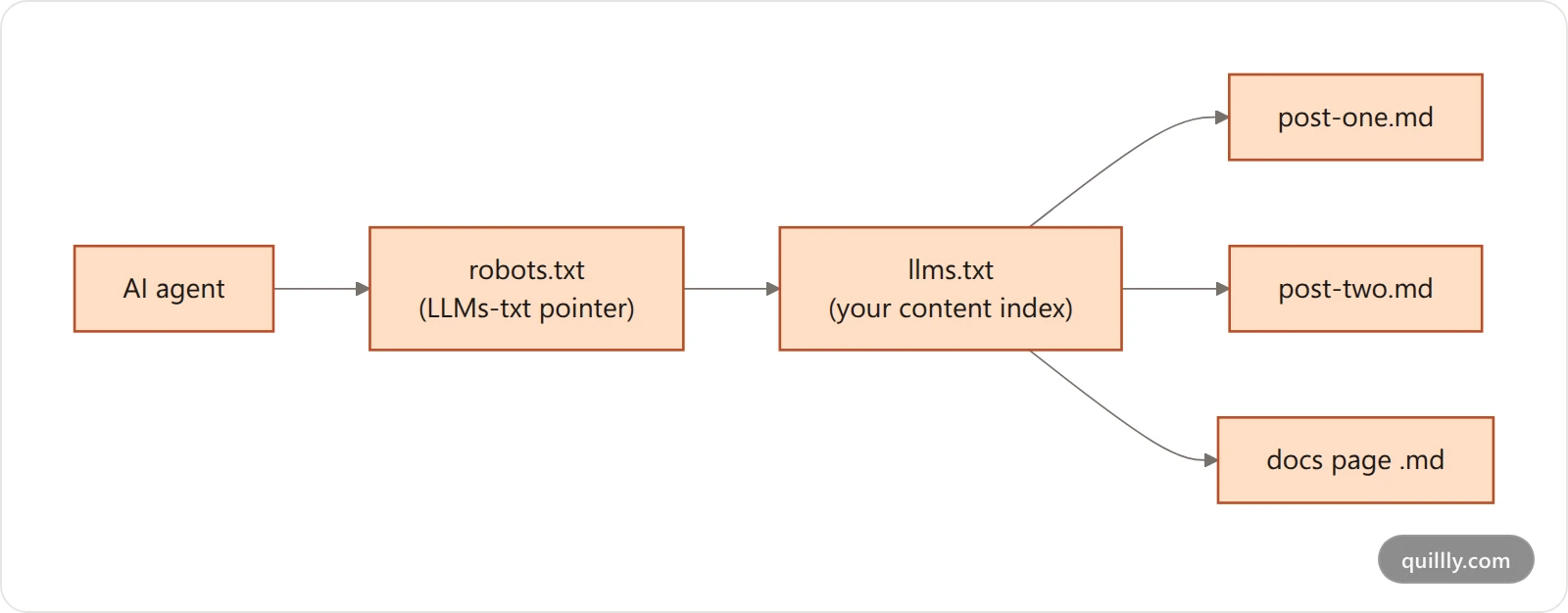
If you've been hand-maintaining any of this, you can stop: it's derived from your content types now.
See what the crawlers are reading
The Pages card in Analytics has a Crawlers view sitting next to Visitors — same list, same layout, ranked by bot crawls instead of human views. Crawler hits on llms.txt are recorded too, so your index fetches show up as their own rows rather than vanishing.
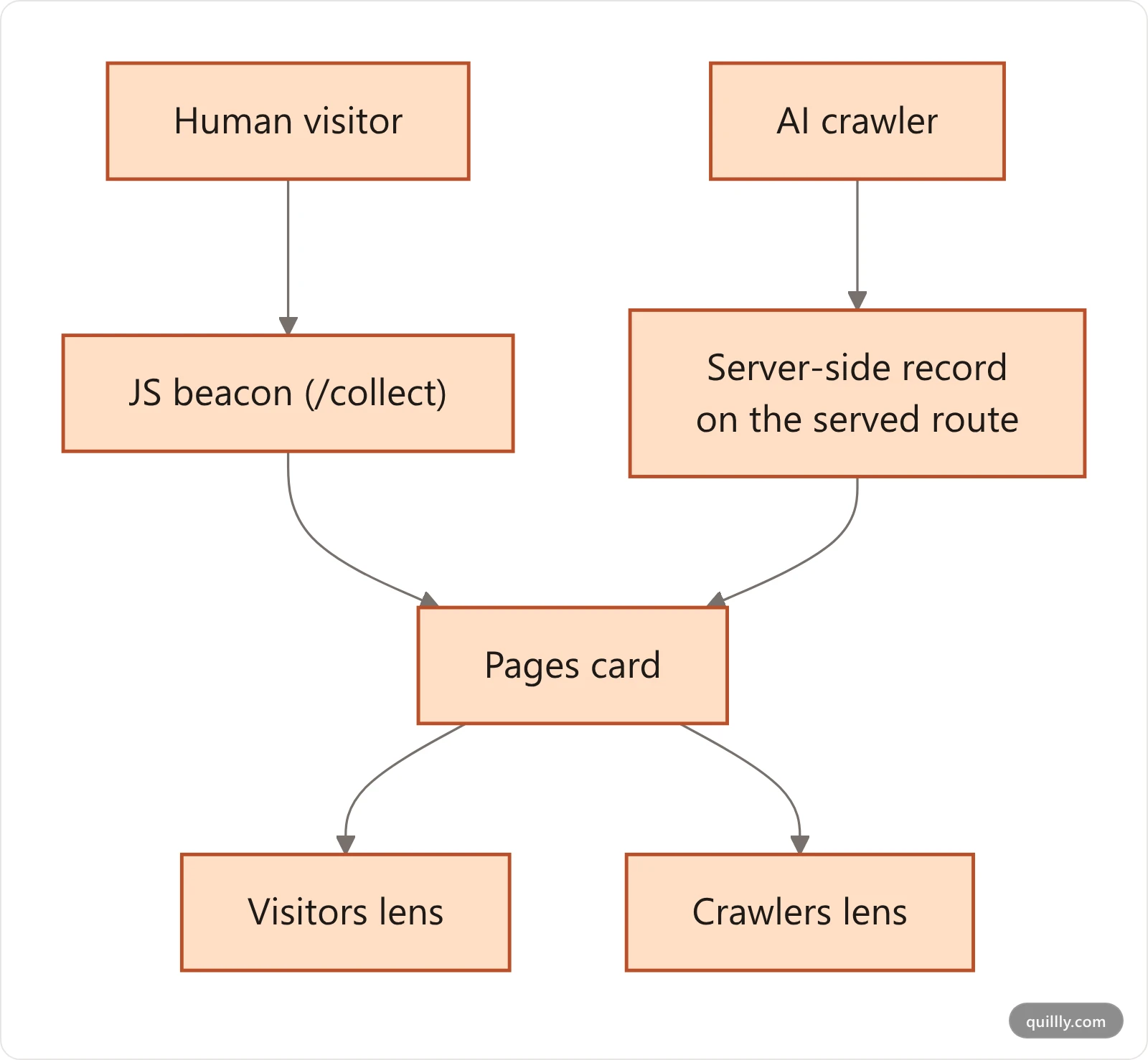
Crawlers don't run JavaScript, so a normal analytics beacon is blind to them by construction. These hits are captured server-side as the page is served, deduped to one row per bot, per page, per hour. It's the difference between guessing that GPTBot found your post and knowing which pages it actually read.
Connections, rebuilt
OAuth connections now appear. If you connected Claude through the browser flow, that connection was invisible in Settings → Connections — only API keys were listed, so something you used every day could read "Never used". OAuth connections are now first-class, with real last-used times and call counts.
A usage panel replaced the single progress bar — 14 days of activity, your most-used tools, and a per-connection breakdown.
Rotate key. A lost key is no longer a dead end: rotating issues a fresh one and kills the old one immediately.
Setup snippets default to a connection key in the URL rather than OAuth, because CLIs and headless setups often give you exactly one field and no browser to sign in with.
New here? Connect Claude, ChatGPT or Cursor takes about two minutes.
Fixes
Opening a dropdown or a dialog no longer shifts the page sideways. The scrollbar gutter was being reserved twice, so locking the background scroll silently narrowed the content by the width of a scrollbar.
Changelog entries now reach the IndexNow engines — Bing, Yandex, Naver, Seznam, Yep and Amazon. Their key location was being derived from the submitted URL's parent path, which for a single-segment changelog URL resolved to the domain root, where no key file is served. Every submission was rejected as unverifiable. It's derived from the path Quillly actually serves now. (IndexNow's spec allows a key file anywhere, as long as the
keyLocationyou send points at it.)The Content menu no longer lands on the Pages tab when your site has real content types configured.
Frequently asked questions
Do I need to change anything?
No. Markdown serving, the canonical headers, the sitemap change and the robots.txt generation are all automatic on your existing content. If you previously added llms.txt links or crawler rules by hand, you can delete them.
Will the .md URLs compete with my articles in search?
No. Every markdown response carries a canonical header pointing at the HTML article, and sitemaps list the article only. Search engines treat the markdown as an alternate representation of a page they already know, not as a second page.
Where do I see which crawlers read my pages?
Open Analytics, find the Pages card, and switch the lens from Visitors to Crawlers. It's the same page list ranked by bot crawls instead of human views, and it includes llms.txt fetches alongside ordinary article reads.
My older changelog entries still show failed IndexNow submissions. Will they clear?
Those are stamps left by the attempts that failed, kept as a record — they don't re-check themselves. Saving the entry again re-submits it and overwrites the status with a fresh result from each engine.
Does llms.txt replace a sitemap?
No — they answer different questions. A sitemap tells a crawler which URLs exist on your site. llms.txt and the markdown twins decide how much of each article actually survives the trip into an AI answer.
Let your AI publish, and see who reads it
Connect Claude, ChatGPT, Cursor or Claude Code to Quillly, publish to your own domain, and watch which crawlers pick it up.
Start free